
Strategy
Marketplace seller software planning template for accessibility task tests
Use a marketplace seller software planning template to test accessibility tasks, record tools and assistive technology, and assign evidence-led follow-up.
Use this template to define and test an accessibility task, recording barriers and follow-up. Tie each record to a real seller or customer task and interfaces such as Amazon Seller Central, eBay Seller Hub or Linnworks. It records evidence, but does not certify a product or decide legal compliance. It supports focused review, not software selection or an implementation timetable.
Set the task and its legal context
Choose one task with a clear start and finish, such as locating a product record, finding a listing field, or completing a defined customer-support activity.
Name the person or role attempting it and the intended outcome. Avoid a broad instruction such as 'test the platform'; it gives neither the tester nor a reviewer a clear task to reproduce.
Accessibility duties depend on who provides the service, who uses it and the circumstances. In Great Britain, the Equality Act 2010 is relevant to service providers and employers, including the duty to make reasonable adjustments. Northern Ireland has a separate legal framework, so check the rules applicable to your location and situation.
The Public Sector Bodies (Websites and Mobile Applications) (No. 2) Accessibility Regulations 2018 apply to in-scope public-sector websites and mobile apps and include accessibility-statement requirements; they do not automatically apply to every private marketplace seller or software supplier. For public-sector websites and apps, the GDS/Central Digital and Data Office accessibility monitoring team monitors accessibility under the 2018 Regulations.
The Equality and Human Rights Commission (EHRC) is relevant to Equality Act enforcement. EN 301 549, Accessibility requirements for ICT products and services, is a technical standard that may be relevant to procurement or a contract; it is not, by itself, a universal legal verdict for every seller. Ask a suitably qualified adviser about the obligations that apply to your case.
Record the scope, access and evidence
Keep the test plan separate from permission to access an account or system. Record who approved the test and who arranged access; do not infer authority from a job title or public profile.
Treating access itself as approval is an account-access planning mistake. If a test record could include personal information, limit what you capture and follow the relevant data-protection review.
Decision record fields
- Decision owner and authority
- Seller legal entity
- England operating rule and evidence
- Marketplace, account and contract owner
- Product population and identifiers
- Source system and accepted baseline
- Observed problem, period and evidence
Use a separate record for each task. Include the task and intended outcome, person or role, interface and journey boundary, test environment, input and assistive technology, expected completion evidence, observation and reference, and an owner with a retest condition. These fields make the test repeatable without turning a brief observation into a claim about the whole service.
| Field | Record for this task |
|---|---|
| Task and intended outcome | [What is the person trying to do, and what counts as completion?] |
| Person or role in scope | [Customer, staff role or other relevant group] |
| Interface and journey boundary | [Screens, pages, systems and hand-offs included] |
| Test environment | [Device, operating system, browser and versions] |
| Input and assistive technology | [Keyboard, screen reader, voice control, magnification or other setup] |
| Expected completion evidence | [What observable result would show the task was completed?] |
| Observation and evidence reference | [What happened, at which step, and where is the supporting record?] |
| Owner and retest condition | [Who will investigate, and when should the task be repeated?] |
Map the seller workflow being tested
Describe the journey as the person encounters it, rather than recording only the name of a screen. A marketplace seller may work across a marketplace interface and a separate catalogue or operations tool; note which system supplies each part of the task.
Do not assume similar-looking controls work the same way in different products or that one test covers every connected interface. Record the seller workflow in scope, identify the system responsible for each part of the journey, and keep the record tied to the task boundary chosen for review.
Product and consumer fields
- Approved identity and description
- Price basis and images rights
- Delivery terms and safety evidence
- Restrictions and withdrawal route
- Listing-field ownership and response
- Consumer journeyordering to support
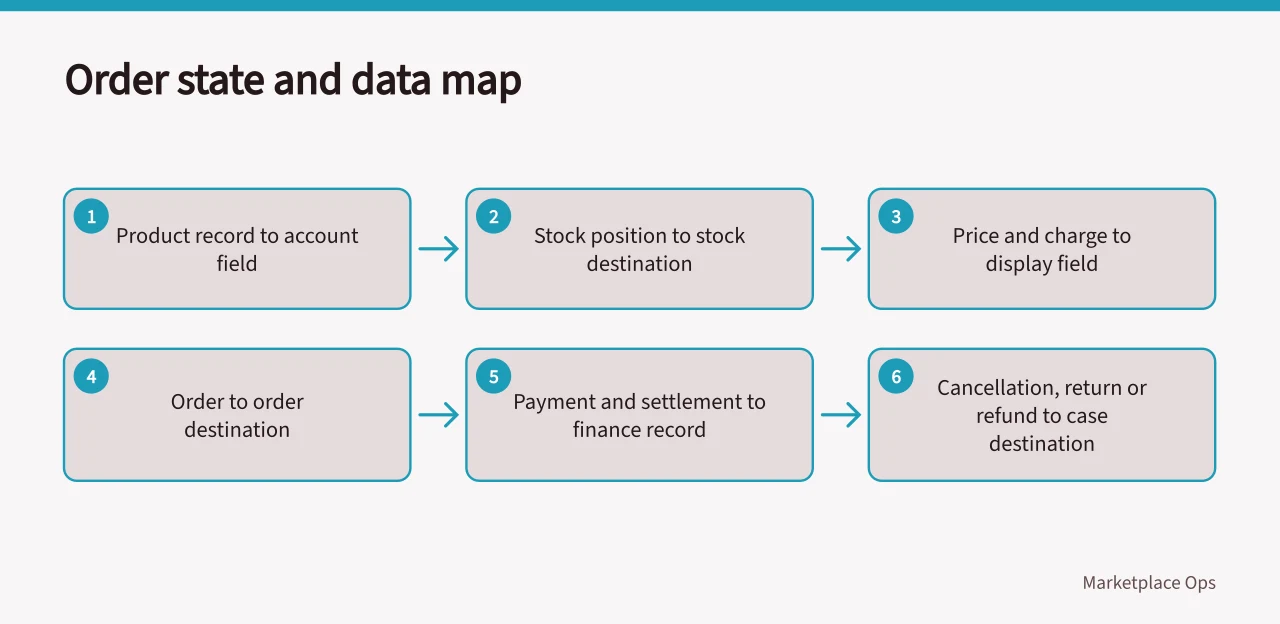
For example, a seller might choose to test locating a product title in Amazon Seller Central, or trace an item record in Linnworks. These are possible task boundaries, not claims about how a seller has configured either product. Write down the journey and account or test environment in scope, rather than treating either example as a description of a seller's setup.
If the task crosses into eBay Seller Hub or another destination, record the hand-off and decide whether that destination is included in this test or needs its own record. Keep the boundary specific to the journey and environment actually being tested. A task in one interface does not, by itself, describe the setup or journey in another destination.
Record the test setup and focused checks
Name the technology used, not just 'screen reader' or 'assistive technology'. Depending on the task and the tester, examples include NVDA or JAWS on Windows, VoiceOver on Apple devices, TalkBack on Android, Dragon voice control, or ZoomText magnification.
Record the version and relevant settings where known, along with the device, operating system, browser and input method. Do not assume one setup's result applies to another. If details are unavailable, note that rather than implying the setup was controlled.
Use the task to focus observation. With keyboard input, note whether the controls needed for the task can be reached and operated, and whether the current focus is visible. With a screen reader, record whether the information and controls needed to continue are announced. For a form, note whether the requested information and any error are identifiable. If the task depends on visual presentation, record what happens when text is enlarged or the display is reflowed.
If using WCAG 2.2 as a technical reference, record the version and the specific success criterion you are investigating. For example, WCAG 2.2 success criterion 2.1.1 concerns Keyboard, 2.4.7 concerns Focus Visible, and 3.3.1 concerns Error Identification. These references help a reviewer understand the test question; a single task observation does not establish conformance with WCAG or EN 301 549.
Automated tools such as axe and Lighthouse can help identify some issues, but a scan is not a substitute for attempting the task with the relevant setup. If a supplier provides an Accessibility Conformance Report (ACR) or a Voluntary Product Accessibility Template (VPAT), record the document, product and version it covers. Treat it as supplier evidence to examine, not as proof that your specific workflow works.
Show what a useful record looks like
The following illustrative example is not a finding about eBay or any supplier.
It records a product-title task, the keyboard setup and browser details, the observed focus issue, evidence to capture, an owner for follow-up, and a WCAG reference to investigate. The entries show how the fields can describe one bounded test.
| Field | Illustrative entry |
|---|---|
| Task | Locate and change a product title in the seller's admin workflow |
| Setup | Keyboard only; record browser and version; record screen-reader name and version if used |
| Observation | In this hypothetical test, the tester cannot identify which control has keyboard focus at the title field |
| Evidence | Note the exact step and capture an appropriate record without unnecessary personal information |
| Follow-up | Assign an interface owner to investigate; repeat the same task and setup after a change |
| Reference to investigate | WCAG 2.2 success criterion 2.4.7, Focus Visible; do not call it a formal failure without assessing the applicable requirement |
Write what happened, not just 'passed' or 'failed'. If no barrier was observed, state which task, interface and setup were actually tested. Keep the conclusion limited to that evidence and assign an owner where further investigation or a retest is needed.
A supplier statement or scan result remains that type of evidence, neither replaces task observations. The quality checklist helps keep evidence separate from conclusions, while a review methodology can structure the assessment. A complete record lets a reviewer identify the task, reproduce the setup, understand what happened and see who owns the next check.